Blogging in Framer: A Complete Guide for Setting Up Using Framer CMS
Welcome! I’m Rajat Adhikari, a dedicated freelance Framer website developer. In this comprehensive guide, I will walk you through every crucial step of blogging in Framer. First, we will explore how to set up your Framer CMS by creating collections and adding essential fields such as banners, images, titles, descriptions, and slugs. Next, I will guide you in designing a visually appealing and strategically optimized blog layout. As we proceed, I will share best practices, content strategies, and practical tips to help you maximize your blogging potential in Framer. By the end, you will gain a comprehensive understanding of how to create dynamic and engaging blog content.
Stay tuned as I break down each step, ensuring you gain practical insights and actionable tips for effective blogging in Framer.
Setting Up Collections and Fields in Framer for Effective Blogging
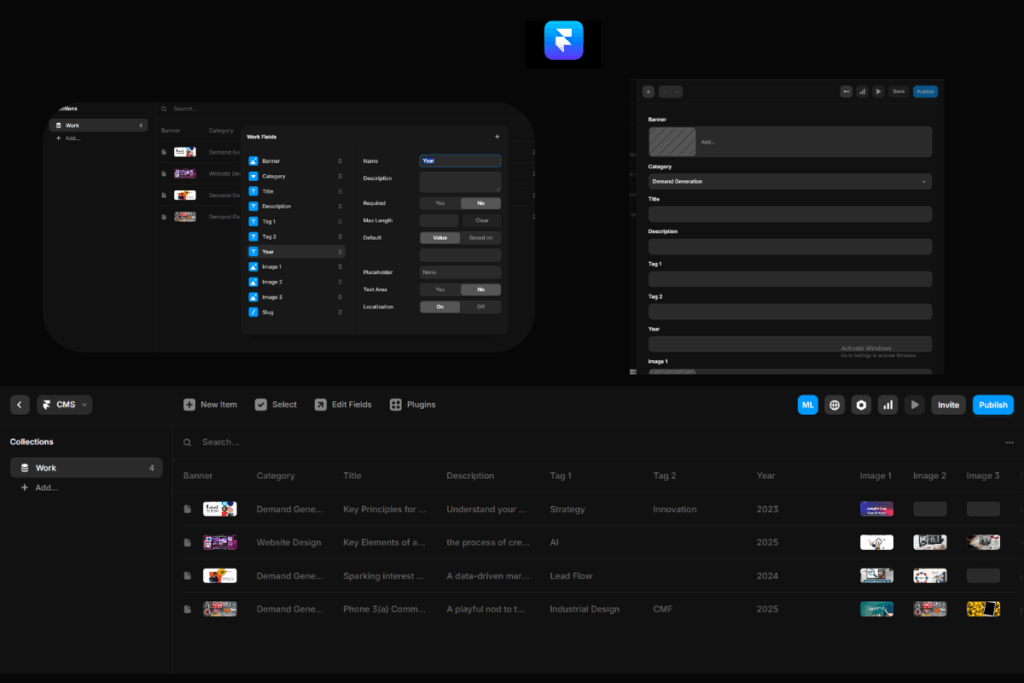
To kickstart successful blogging in Framer, we first need to establish our collections. In Framer, a collection serves as the backbone, holding all your blog posts in one organized structure. Each collection will contain individual items, representing separate blog posts.
Once we have our collection, the next step is to define the fields. Fields are the individual data points that shape each blog post. For example, we can add fields for banner images, titles, descriptions, categories, and slugs. By clicking on the “Add Fields” button in the CMS, we can seamlessly incorporate each element. For instance, to add a banner image, we simply create that field and upload the image. Similarly, we can set up fields for categories to organize content, and text fields for titles and descriptions.
After setting up these fields, we can begin adding content items to our collection. For every blog post, we upload the banner image, choose the appropriate category, and fill in the title and description. We can even add multiple images or additional text fields as needed, ensuring each blog post is comprehensive and well-structured.
In this way, collections serve as a central repository, holding all the data and structure needed for our blog. This systematic approach not only streamlines the blogging process but also ensures that maintaining and updating content is straightforward and efficient. Ultimately, this ensures that your blog remains dynamic, well-organized, and optimized for both readers and search engines.
Designing the Blog Layout: Creating Index and Detailed Pages in Framer
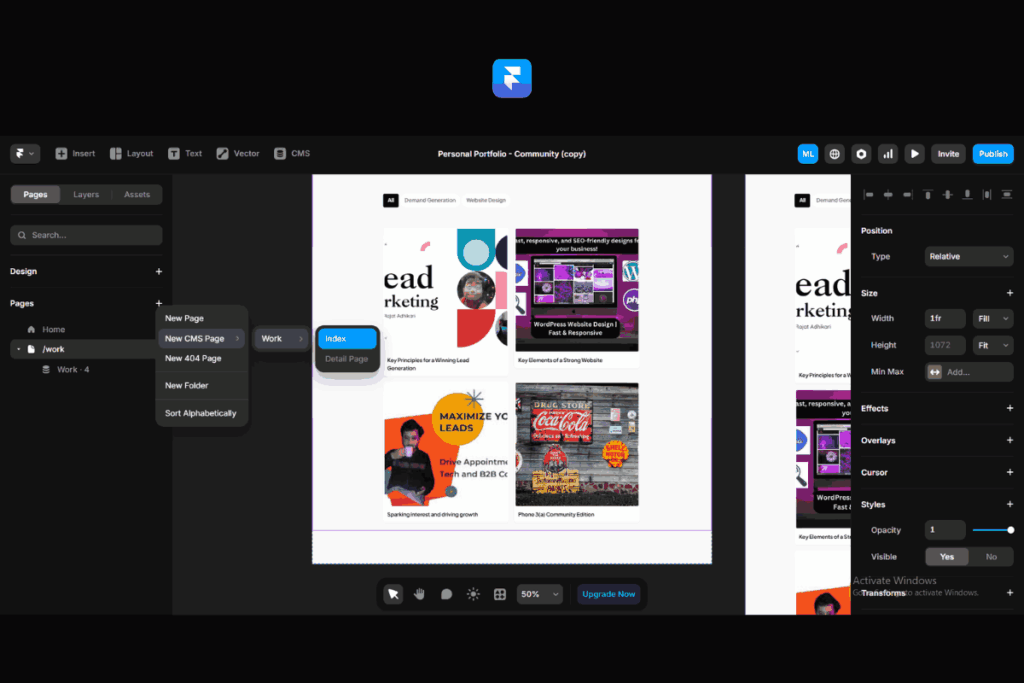
In Framer, designing both index and detailed pages is crucial for effective blogging. Firstly, the index page acts as the gateway to your content. It presents blog post titles, preview images, and brief descriptions in a dynamic layout. This ensures that visitors can quickly scan through your content and find what interests them.
Moreover, the detailed page dives deeper into each blog post. It showcases the full text, additional images, and comprehensive metadata. By integrating these elements within Framer’s content management system, I ensure that each detailed page remains engaging and informative. This setup helps readers navigate seamlessly through content and boosts their overall experience.
In essence, creating both index and detailed pages in Framer is essential for a well-structured and user-friendly blog. This approach not only enhances the reader’s journey but also optimizes the content for search engines, ensuring better visibility and engagement.
Designing the Index Page
To effectively create the index page in Framer, I begin by organizing all blog posts into a dynamic layout. This page displays post titles, preview images, and brief descriptions, all seamlessly managed through the Framer CMS. I ensure that each element is thoughtfully placed, making the page both visually appealing and easy to navigate. By following Framer blog design best practices, I create an engaging and well-organized index page.
Building the Detailed Page
When crafting the detailed page for each blog post, I delve deeper into the content. This page showcases the full text, additional images, and comprehensive metadata, all integrated within the Framer content management system. I ensure that each element, from the main body of text to related posts and categories, is well-organized and easy to navigate. By applying effective Framer blog content strategy, I ensure that each detailed page remains engaging, informative, and optimized for readers and search engines alike.
Implementing SEO Best Practices in Framer
To maximize the visibility of your blog in Framer, it’s essential to implement effective SEO strategies. Firstly, focus on optimizing both index and detailed pages. For index pages, I ensure that post titles, preview images, and descriptions are all crafted with relevant keywords. In addition, I pay close attention to meta descriptions, ensuring they are compelling and keyword-rich.
For detailed pages, I dive deeper into content optimization. This includes using header tags strategically, integrating alt text for images, and ensuring that the content is both informative and keyword-optimized. I also emphasize the importance of internal linking, helping readers and search engines navigate your content seamlessly.
By following these SEO best practices in Framer, I ensure that each page is not only user-friendly but also optimized for search engines, ultimately boosting your blog’s reach and engagement.
Get in Touch: Expert Blogging and SEO in Framer
As a dedicated freelance Framer website developer and digital marketer, I specialize in effective blogging and SEO strategies within the Framer CMS. If you’re looking to elevate your blog’s performance and visibility, I’m here to help. Feel free to reach out for expert assistance in content writing, blogging in Framer, and implementing robust SEO practices.
Stay tuned for more insights and tips on optimizing your Framer blog, mastering SEO, and creating engaging content. I’m committed to helping you achieve your blogging goals in Framer, and I look forward to connecting with you!
Error: Contact form not found.